Permissions
In the Permissions section, users can define specific role-based permissions for the event. This allows for granular control over the roles assigned within the event, including the ability to override default permissions for even high-level roles. This feature ensures that event organizers can customize access and capabilities as needed, limiting or expanding functionalities based on the selected permissions.
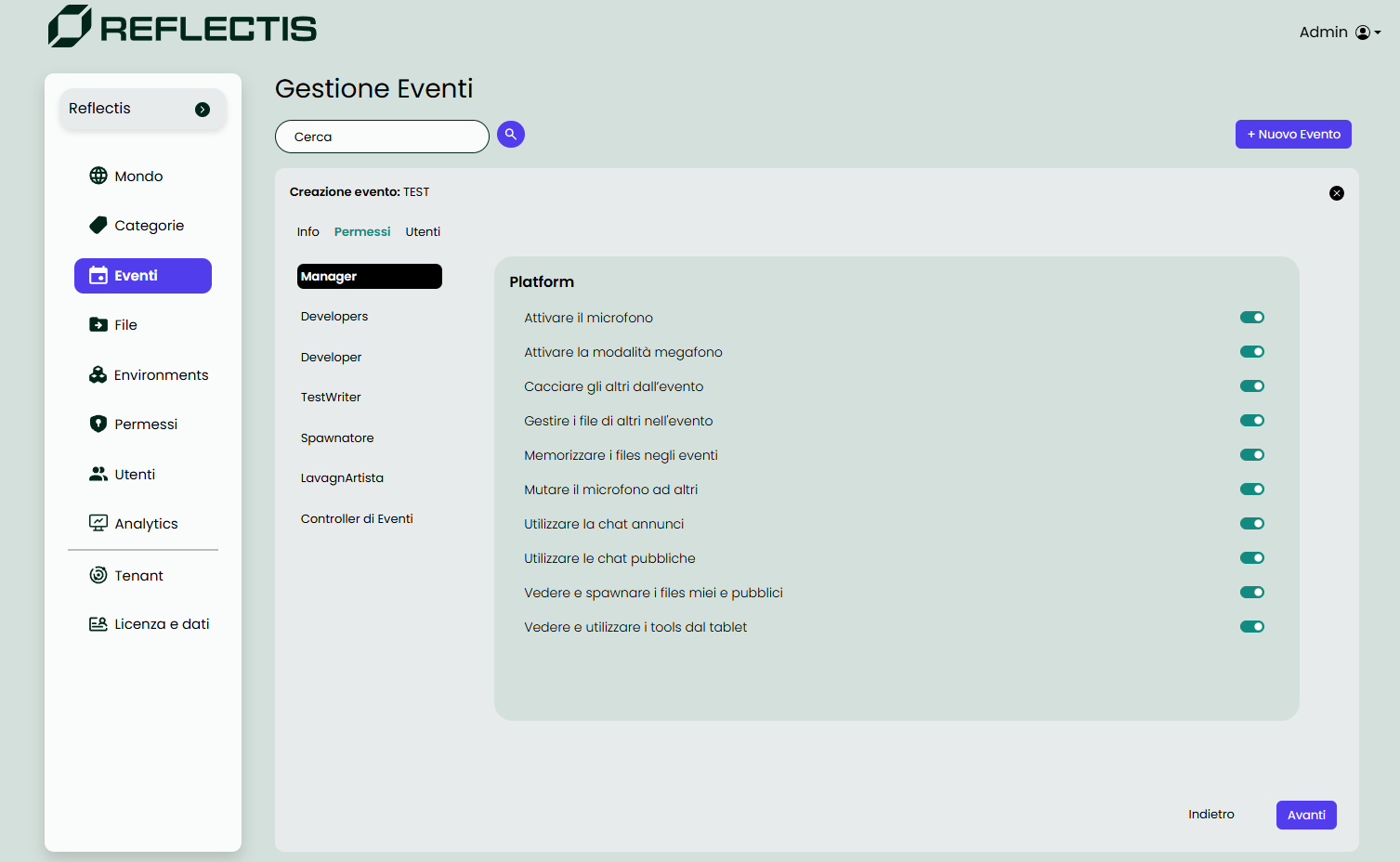
Available Permissions
Users can enable or disable the following permissions for each role within the event:
- Activate Microphone: Allow users to enable their microphone.
- Activate Megaphone Mode: Enable a louder broadcast mode.
- Eject Others from the Event: Permit users to remove others from the event.
- Manage Files of Others: Allow users to handle files belonging to others within the event.
- Store Files in Events: Enable saving assets and their positions within the event to the database, allowing for persistence of files and their spatial configurations.
- Mute Microphone for Others: Grant the ability to mute others' microphones.
- Use Announcement Chat: Allow access to announcement-specific chat.
- Use Public Chat: Permit use of public chat channels.
- View and Spawn My and Public Files: Allow visibility and spawning of personal and public files.
- View and Use Tools from Tablet: Enable access to various tools from the tablet interface.
Navigation
Once all required permissions have been configured, click the Next button located at the bottom right of the page to proceed. If further adjustments are needed to the previous section, use the Back button to navigate back and make modifications.